
96 lines
5.9 KiB
Markdown
96 lines
5.9 KiB
Markdown
# MiniMax Skills
|
|
|
|
[中文版](./README_zh.md)
|
|
|
|
> **Beta** — This project is under active development. Skills, APIs, and configuration formats may change without notice. We welcome feedback and contributions.
|
|
|
|
Development skills for AI coding agents. Plug into your favorite AI coding tool and get structured, production-quality guidance for frontend, fullstack, Android, iOS, and shader development.
|
|
|
|
## Skills
|
|
|
|
| Skill | Description | Source |
|
|
|---------------------------------------|-------------|--------|
|
|
| `frontend-dev` | Full-stack frontend development combining premium UI design, cinematic animations (Framer Motion, GSAP), AI-generated media assets via MiniMax API (image, video, audio, music, TTS), persuasive copywriting (AIDA framework), and generative art (p5.js, Three.js, Canvas). Tech stack: React / Next.js, Tailwind CSS. | Official |
|
|
| `fullstack-dev` | Full-stack backend architecture and frontend-backend integration. REST API design, auth flows (JWT, session, OAuth), real-time features (SSE, WebSocket), database integration (SQL / NoSQL), production hardening, and release checklist. Guided workflow: requirements → architecture → implementation. | Official |
|
|
| `android-native-dev` | Android native application development with Material Design 3. Kotlin / Jetpack Compose, adaptive layouts, Gradle configuration, accessibility (WCAG), build troubleshooting, performance optimization, and motion system. | Official |
|
|
| `ios-application-dev` | iOS application development guide covering UIKit, SnapKit, and SwiftUI. Touch targets, safe areas, navigation patterns, Dynamic Type, Dark Mode, accessibility, collection views, and Apple HIG compliance. | Official |
|
|
| `shader-dev` | Comprehensive GLSL shader techniques for creating stunning visual effects — ray marching, SDF modeling, fluid simulation, particle systems, procedural generation, lighting, post-processing, and more. ShaderToy-compatible. | Official |
|
|
| `gif-sticker-maker` | Convert photos (people, pets, objects, logos) into 4 animated GIF stickers with captions. Funko Pop / Pop Mart style, powered by MiniMax Image & Video Generation API. | Official |
|
|
| `minimax-pdf` | Generate, fill, and reformat PDF documents with a token-based design system. CREATE polished PDFs from scratch (15 cover styles), FILL existing form fields, or REFORMAT documents into a new design. Print-ready output with typography and color derived from document type. | Official |
|
|
| `pptx-generator` | Generate, edit, and read PowerPoint presentations. Create from scratch with PptxGenJS (cover, TOC, content, section divider, summary slides), edit existing PPTX via XML workflows, or extract text with markitdown. | Official |
|
|
| `minimax-xlsx` | Open, create, read, analyze, edit, or validate Excel/spreadsheet files (.xlsx, .xlsm, .csv, .tsv). Covers creating new xlsx from scratch via XML templates, reading and analyzing with pandas, editing existing files with zero format loss, formula recalculation, validation, and professional financial formatting. | Official |
|
|
| `minimax-docx` | Professional DOCX document creation, editing, and formatting using OpenXML SDK (.NET). Three pipelines: create new documents from scratch, fill/edit content in existing documents, or apply template formatting with XSD validation gate-check. | Official |
|
|
| `minimax-multimodal-toolkit` | Generate voice, music, video, and image content via MiniMax APIs — the unified entry for MiniMax multimodal use cases. Covers TTS (text-to-speech, voice cloning, voice design, multi-segment), music (songs, instrumentals), video (text-to-video, image-to-video, start-end frame, subject reference, templates, long-form multi-scene), image (text-to-image, image-to-image with character reference), and media processing (convert, concat, trim, extract) via FFmpeg. | Official |
|
|
|
|
## Installation
|
|
|
|
### Claude Code
|
|
|
|
```bash
|
|
claude plugin marketplace add https://github.com/MiniMax-AI/skills
|
|
claude plugin install minimax-skills
|
|
```
|
|
|
|
### Cursor
|
|
|
|
```bash
|
|
git clone https://github.com/MiniMax-AI/skills.git ~/.cursor/minimax-skills
|
|
```
|
|
|
|
Add to your Cursor settings — point the skills path to `~/.cursor/minimax-skills/skills/`.
|
|
For Windows setup and verification, see [`.cursor-plugin/INSTALL.md`](.cursor-plugin/INSTALL.md).
|
|
|
|
### Codex
|
|
|
|
```bash
|
|
git clone https://github.com/MiniMax-AI/skills.git ~/.codex/minimax-skills
|
|
|
|
mkdir -p ~/.agents/skills
|
|
ln -s ~/.codex/minimax-skills/skills ~/.agents/skills/minimax-skills
|
|
```
|
|
|
|
Restart Codex to discover the skills. See [`.codex/INSTALL.md`](.codex/INSTALL.md) for Windows instructions and details.
|
|
|
|
### OpenCode
|
|
|
|
```bash
|
|
git clone https://github.com/MiniMax-AI/skills.git ~/.minimax-skills
|
|
|
|
mkdir -p ~/.config/opencode/skills
|
|
ln -s ~/.minimax-skills/skills/* ~/.config/opencode/skills/
|
|
```
|
|
|
|
Restart OpenCode to discover the skills. See [`.opencode/INSTALL.md`](.opencode/INSTALL.md) for details.
|
|
|
|
### VS Code
|
|
|
|
This repository does not currently ship a standalone VS Code extension.
|
|
|
|
If you use VS Code, the supported approach is to run one of the supported CLI tools inside the integrated terminal:
|
|
- Codex
|
|
- Claude Code
|
|
- OpenCode
|
|
|
|
If you want native local-skills configuration from this repo, use Cursor and follow [`.cursor-plugin/INSTALL.md`](.cursor-plugin/INSTALL.md).
|
|
|
|
## Contributing
|
|
|
|
We welcome contributions! Before submitting a PR, please read:
|
|
|
|
- [CONTRIBUTING.md](./CONTRIBUTING.md) — PR format, skill structure requirements, and development guidelines
|
|
- [PR Review Rules](./.claude/skills/pr-review/SKILL.md) — automated validation checks and quality review criteria
|
|
|
|
You can run the validation script locally before submitting:
|
|
|
|
```bash
|
|
python .claude/skills/pr-review/scripts/validate_skills.py
|
|
```
|
|
|
|
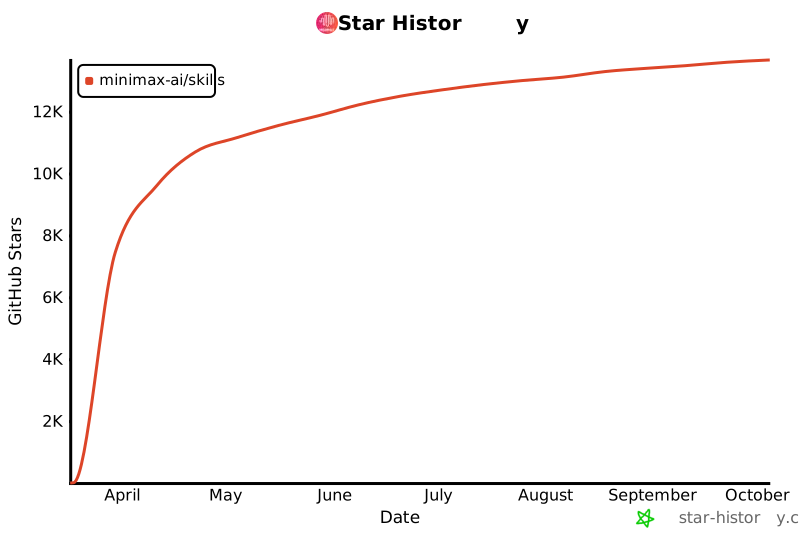
## ⭐ Star History
|
|
|
|
[](https://star-history.com/#MiniMax-AI/skills&Date)
|
|
|
|
## License
|
|
|
|
[MIT](./LICENSE)
|